
If your AC fan isn’t spinning, the issue is usually a simple fix like a tripped breaker, a bad capacitor, or a loose wire. We will walk through safe, easy checks to get that fan moving again without calling a technician right away.
It’s hot outside, and your air conditioner is just humming. That is frustrating, right? When the fan stops blowing, your whole house gets warm fast. You might worry that a big repair bill is coming soon. Don’t worry about that yet! Many fan problems are easy for a homeowner to check first. I am Jack from ACReviewHub.com, and I will show you how to look at the simple things first. We will go step-by-step so you feel confident fixing this.
What to Do First: Safety and Simple Checks
Safety is the most important thing when working near electricity. Always turn off the power to your AC unit before touching anything inside the outside unit (the condenser). You can usually flip the breaker switch at your main electrical panel. If you can’t find the breaker, there is usually a dedicated shut-off box right next to the outdoor unit. Flip that switch off!
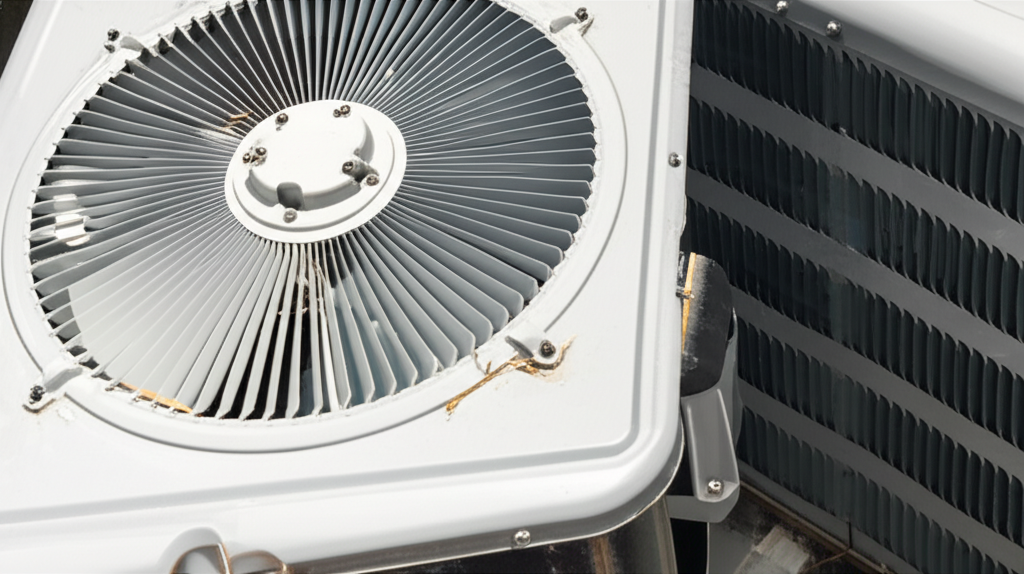
Once the power is off, let’s check the easy stuff. Sometimes, dirt or leaves block the fan blades from turning. Gently check if the blades move by hand. If they feel stuck, clear away any debris you see around the fan cage. This is a very common, simple fix.
Checking the Power Supply: Breakers and Fuses
The AC system needs a lot of power to run. If the fan isn’t spinning but the indoor unit (air handler) is still blowing air, the problem might be with the outdoor unit’s power supply. Check your home’s main electrical panel.
Look for a breaker labeled “AC,” “HVAC,” or “Condenser.” If it is flipped to the “Off” position or is sitting in the middle (tripped position), flip it completely off, then firmly back to “On.” See if the outdoor unit kicks on now. If it trips again right away, stop! That means there is a bigger electrical short we need a professional for.
The Capacitor Conundrum: The AC Fan’s Little Helper
The capacitor is a small part that gives the fan motor the big jolt of electricity it needs to start spinning. Think of it like a tiny battery booster for the motor. If the fan is humming but not spinning, a bad capacitor is the number one suspect.
Warning: Capacitors hold an electrical charge even when the power is off. If you are not comfortable working with electrical components, this is the point where you should call a trusted HVAC technician. Safety first, always!
If you choose to check it yourself (with the power completely off at the breaker):
- Locate the access panel on the side of the outdoor unit.
- Find the capacitor—it looks like a small can.
- Visually inspect it. If it looks swollen, bulging, or oily, it has failed and needs replacing.
Diagnosing the Motor: Fan or Capacitor?
How do you know if the motor itself is dead or if it’s just the capacitor failing to start it? Here is a quick way to test this, again, only after turning the power completely off.
If you gently try to spin the fan blades by hand when the unit is turned off, and they spin freely, the motor bearings might be okay. If the fan is humming loudly but won’t spin, it’s usually the capacitor. If the fan doesn’t move at all when you try to spin it, or if it wobbles badly, the motor might be seized up or the blades could be physically obstructed.
| Symptom | Most Likely Cause | What to Do Next |
|---|---|---|
| Unit is silent, no humming. | Tripped breaker or disconnect switch off. | Check the electrical panel first. |
| Loud humming, fan not moving. | Bad capacitor. | Call an HVAC pro for safe replacement. |
| Fan spins slowly or seems weak. | Failing capacitor or dirty fan blades. | Clean blades; if it continues, replace capacitor. |
When to Call the AC Expert
While checking the power and cleaning debris are great DIY steps, some issues require professional help. Knowing when to stop saves you time and prevents damage.
You should call an HVAC technician if:
- The circuit breaker keeps tripping immediately after you reset it.
- You suspect the capacitor needs replacing, as they can shock you.
- The fan motor is physically burned out or making grinding noises.
- You have checked all the simple electrical things and the fan still won’t start.
For more detailed information on common AC maintenance and part locations, the Department of Energy offers great resources on home cooling efficiency. Check out these tips from Energy.gov.
Frequently Asked Questions (FAQ) for Beginners
Here are answers to the questions I hear most often about lazy AC fans.
Q1: Can I just leave the AC running if the outside fan isn’t spinning?
A: No, you must turn it off immediately! The compressor will overheat without the fan moving air over the coils, leading to very expensive damage.
Q2: How long does it take for the fan to start after I turn the power back on?
A: It should start almost instantly, within a few seconds of the unit powering up. If you wait more than 30 seconds, something is wrong.
Q3: Is it expensive to replace an AC fan motor?
A: Replacing the whole motor is usually more expensive than replacing just the capacitor. Get a quote, but expect motor replacement to be a mid-range repair.
Q4: Should I spray water on the fan blades to clean them?
A: Never spray water directly into the unit while it is connected to power! Turn off the breaker first. Usually, a soft brush or cloth is enough to clear dust.
Q5: My fan is spinning, but the air is warm. What gives?
A: If the fan is spinning, the problem is likely low refrigerant or a dirty condenser coil, not the fan itself. That usually needs a pro check.
Q6: How often should I check the outside unit?
A: At least twice a year—once in the spring before you start using it heavily, and once in the fall after you turn it off.
Q7: Can a dirty filter stop the outside fan?
A: No, the indoor filter affects the indoor blower, not the outdoor fan motor directly, but a clogged indoor system can cause the outdoor unit to work inefficiently.
It feels great when you solve a home mystery without needing a service call, doesn’t it? Remember, staying cool starts with simple checks. By taking care of the basics—checking power and clearing debris—you keep your AC running smoothly and save money. Keep up these small maintenance habits, and your unit will reward you with cool, comfortable air all season long. You’ve got this!
